How To Solve CAPTCHA In A Few Steps In Python Using 2captcha

I am a self-taught Python developer who loves to write on Python Programming and quite obsessed with Machine Learning.
You may have solved millions of captchas for verification, which can be a tedious chore when you need to authenticate your identity as a human. These websites offer an additional layer of security by utilizing captcha services to prevent bots and automation scripts from accessing their website.
What is CAPTCHA?
CAPTCHA (Completely Automated Public Turing Test to Tell Computers and Humans Apart) is a form of challenge-response test used to assess whether or not a user is human.
CAPTCHAs display jumbled, scrambled, or distorted text, images, numbers, and audio that is tough for computers to solve but relatively easy for people to solve. These are used to protect websites and applications against harmful actions.
2captcha API
There are numerous applications and services available to assist us in solving a captcha in seconds. 2captcha is a website that offers captcha-solving services.
2captcha provides API for various programming languages, including Python, and we'll utilise the 2captcha-python library to solve the captcha in a few steps.
Installing dependencies
The primary work is to install the Python library called 2captcha-python. Run the following command in your terminal.
pip install 2captcha-python
Please keep in mind that we are using pip to install the library. If you are not using pip, the installation command will be different.
Solving reCAPTCHA
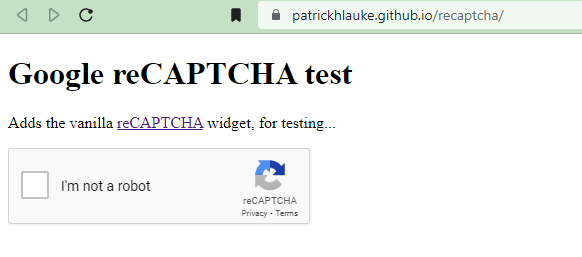
We'll use a reCAPTCHA testing website and here's the URL of the website https://patrickhlauke.github.io/recaptcha/. It provides a reCAPTCHA widget for testing purposes.
Code
First, we must import the library and create an instance of the class TwoCaptcha, which we will initialise with the API key. To make a POST request to the target site, we also need the requests library.
# Imported the required libs
from twocaptcha import TwoCaptcha
import requests

# Instance of TwoCaptcha
solver = TwoCaptcha('YOUR_API_KEY')
After we've built the instance, the next step is to obtain the token from the 2captcha server.
# Target website URL
site_url = "https://patrickhlauke.github.io/recaptcha/"

# Getting the token
try:
    # For solving reCAPTCHA
    token = captcha_solver.recaptcha(
        sitekey='6Ld2sf4SAAAAAKSgzs0Q13IZhY02Pyo31S2jgOB5',
        url=site_url
    )

# Handling the exceptions
except Exception as e:
    raise SystemExit('Error: CAPTCHA token not recieved.')

# Print the token and exit the program
else:
    SystemExit('Token- ' + str(token))
We called the recaptcha method from the instance captcha_solver within the try block and passed the reCAPTCHA data-sitekey to the sitekey parameter and the URL of the target site to the url parameter.
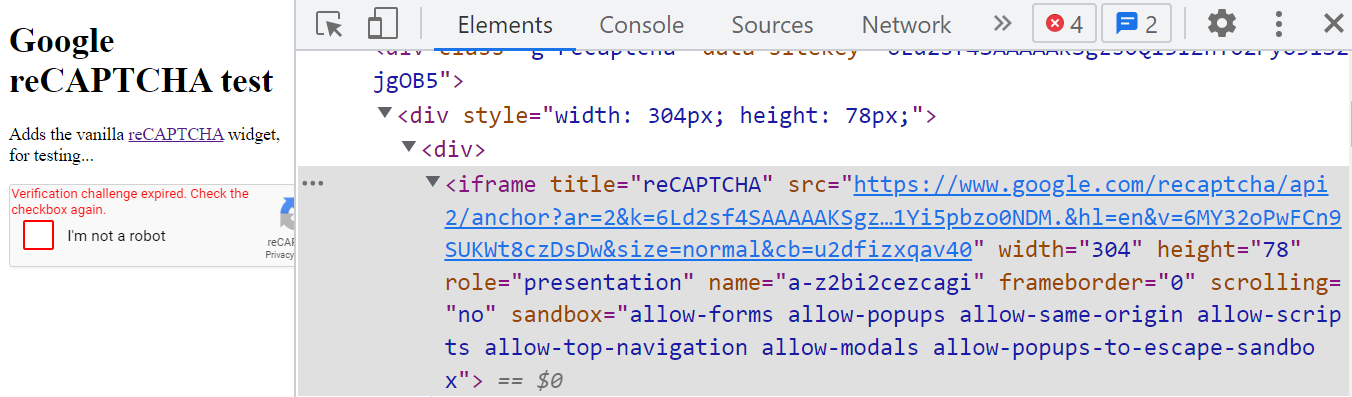
To get the sitekey from the website, open it in inspect mode and look for the tag <iframe> with title="reCAPTCHA" and you'll find the key within the src attribute.
If any exceptions are triggered within the except block, the program will display an error message and exit. If the program is successfully executed, it will return the token that will be used to solve reCAPTCHA and then quit.
The final step will be to transfer the token to the target site, which will be accomplished by sending a POST request to the target site via the requests library.
# Imported the required libs
from twocaptcha import TwoCaptcha
import requests

# Instance of TwoCaptcha
captcha_solver = TwoCaptcha('YOUR_API_KEY')

# Target website URL
site_url = "https://patrickhlauke.github.io/recaptcha/"

# Getting the token
try:
    # For solving reCAPTCHA
    token = captcha_solver.recaptcha(
        sitekey='6Ld2sf4SAAAAAKSgzs0Q13IZhY02Pyo31S2jgOB5',
        url=site_url
    )

# Handling the exceptions
except Exception as e:
    raise SystemExit('Error: CAPTCHA token not recieved.')

# Sending the token to the website
else:
    # Sending spoof user-agent
    headers = {'user-agent': 'Mozilla/5.0 Chrome/52.0.2743.116 Safari/537.36'}

    # Sending recieved token
    data = {'recaptcha-token': str(token)}

    # Making POST request to the target site
    token_response = requests.post(site_url, headers=headers, data=data)

    print('Token sent')
We changed the else part of the code, and the result is the code seen above. Before performing the POST request to the target site, we've established certain configurations to send along with the request within the else block.
We used the requests library's post function to send a POST request to the target site, passing the site_url (target site URL), headers (containing the user-agent), and data (containing token). The data can contain more parameters depending on the form.
Note: The received token from the 2captcha servers will only be valid for 120 seconds, so you need to submit the token to the target site within the time limit.
Solving hCAPTCHA
The URL of the hCAPTCHA demo site is https://accounts.hcaptcha.com/demo.

The procedure will be the same as with reCAPTCHA, with the exception that we must modify the method to hcaptcha from the 2captcha-python package.
# Imported the required libs
from twocaptcha import TwoCaptcha
import requests

# Instance of TwoCaptcha
captcha_solver = TwoCaptcha('YOUR_API_KEY')

# Target website URL
site_url = "https://accounts.hcaptcha.com/demo"

# Getting the token
try:
    # For solving hCAPTCHA
    token = captcha_solver.hcaptcha(
        sitekey='a5f74b19-9e45-40e0-b45d-47ff91b7a6c2',
        url=site_url
    )

# Handling the exceptions
except Exception as e:
    raise SystemExit('Error: CAPTCHA token not recieved.')

# Sending the token to the website
else:
    # Sending spoof user-agent
    headers = {'user-agent': 'Mozilla/5.0 Chrome/52.0.2743.116 Safari/537.36'}

    # Sending recieved token
    data = {'hcaptcha-token': str(token)}

    # Making POST request to the target site
    token_response = requests.post(site_url, headers=headers, data=data)

    print('Token sent')
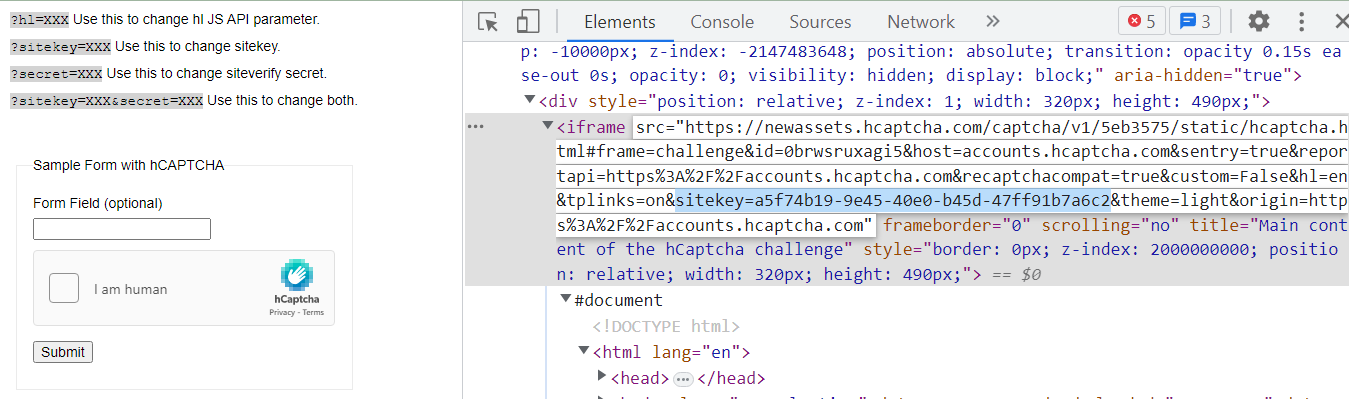
We'll get the sitekey of the hCAPTCHA within the src attribute of the <iframe> tag.
Conclusion
We've used the 2captcha-python package for solving the reCAPTCHA and hCAPTCHA. The 2captcha-python package provided by 2captcha provides captcha-solving services and almost all types of captcha can be solved using their APIs. They provide a browser extension for solving CAPTCHAs.