How to Find and Delete Duplicate Rows from Dataset Using pandas

I am a self-taught Python developer who loves to write on Python Programming and quite obsessed with Machine Learning.
Data preprocessing is an essential part of machine learning in terms of data analysis and building a robust machine learning model. A well processed and clean data can make a difference.
When working with multiple datasets and attempting to merge them, it's common to encounter issues such as missing values, data type mismatches, duplicate data, and more.
In this article, you will see how duplicate data can be easily removed using the pandas library.
Sample Dataset
In this tutorial, you will learn how to effectively remove duplicate rows from a car dataset. You'll explore the step-by-step process of identifying and eliminating duplicate entries, ensuring that your data remains clean and accurate for analysis.
import pandas as pd
df = pd.read_csv('car.csv')
df.head(10)
df.shape
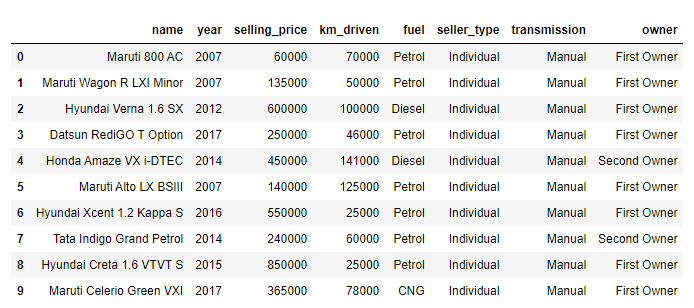
Here are the first 10 entries from the car dataset.
print(f"The Shape of the Dataset: {df.shape}")
Output
The Shape of the Dataset: (4340, 8)
You can see that the dataset contains 4340 rows and 8 columns.
Removing Duplicate Entries from the Dataset
In this section, you'll learn how to use the pandas library to find and remove duplicate entries from a dataset.
Finding Duplicate Rows
The first step is to identify or find the rows that share the same data in the dataset.
The DataFrame.duplicated() function can be used to identify the duplicate rows in a dataset. The DataFrame.duplicated() function returns a boolean Series where each row is marked as True if it is a duplicate and False if it is not a duplicate.
In simple words, The DataFrame.duplicated() function checks each row in a DataFrame and compares it to the previous rows. When it finds a row with the same values as a previous row, it marks that row as True in the resulting boolean Series.
# Identifying the duplicated rows
dup = df.duplicated()
dup.head(20)
The above code will identify the duplicated rows in the specified dataset. It prints the first 20 rows of duplicate data.
0     False
1     False
2     False
3     False
4     False
5     False
6     False
7     False
8     False
9     False
10    False
11    False
12    False
13     True
14     True
15     True
16     True
17     True
18     True
19     True
20     True
dtype: bool
Syntax
DataFrame.duplicated(subset=None, keep='first')
Parameters:
subset: To identify duplicate values on certain columns. This considers all the columns by default.
keep: This parameter determines which duplicates to mark
first: Mark duplicates asTrueexcept for the first occurrence.last: Mark duplicates asTrueexcept for the last occurrence.False: Mark all duplicates asTrueincluding the first and last occurrence.
Now let's determine the number of duplicate rows in the car dataset.
# Determing the number of duplicate rows
dup = df.duplicated(keep='first')
duplicate_rows = df[dup]
duplicate_count = len(duplicate_rows)
print(f"Number of duplicate rows: {duplicate_count}")
The above code will mark the duplicate rows as True except for the first occurrence and then all the duplicate rows will be stored inside the duplicate_rows variable using a df[dup].
The length of the duplicate rows is then calculated and printed using len(duplicate_rows).
Number of duplicate rows: 763
You can see that 763 rows are marked as duplicates. The number of duplicate rows will differ from the above result if you use keep=False.
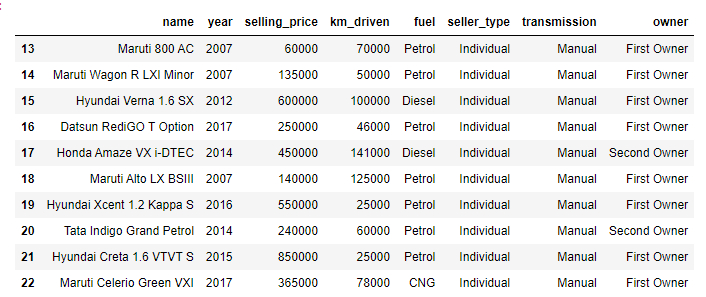
To see which rows are duplicates, you can use the variable duplicate_rows to print them.
duplicate_rows.head(10)
Deleting the Duplicate Rows
Now the second step is to delete the rows identified as duplicates from the dataset.
To carry out this operation, you can use the drop_duplicates() function provided by the pandas library. This function removes the duplicate rows and returns the DataFrame.
Syntax
DataFrame.drop_duplicates(subset=None, keep='first', inplace=False, ignore_index=False)
Parameters:
subset: To identify duplicate values on certain columns. This considers all the columns by default.
keep: This parameter determines which duplicates to keep
first: Delete duplicates except for the first occurrence.last: Delete duplicates except for the last occurrence.False: Delete all duplicates including both first and last occurrence.
inplace: Whether to modify the dataset. If set to True, the DataFrame will be modified in place, and no new DataFrame is returned.
ignore_index: If set to True, it will reset the index of the resulting DataFrame.
Here's how you can delete the duplicate rows after identifying them from the dataset.
data = df.drop_duplicates()
print(f"The Shape of the Dataset: {data.shape}")
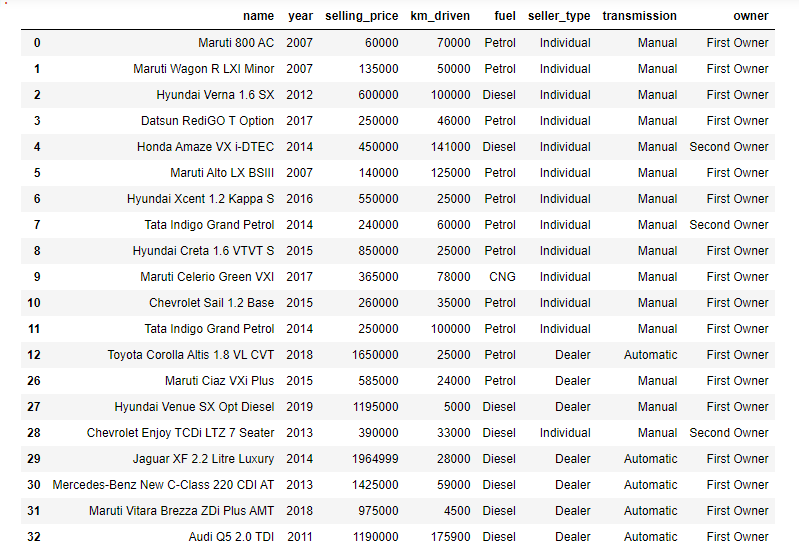
The above code will delete all the duplicate rows keeping the first occurrence of each duplicated row. The shape of the DataFrame is printed after duplicate rows have been removed.
The Shape of the Dataset: (3577, 8)
You can notice that the shape of the DataFrame has changed. After removing the duplicated data the DataFrame now has 3577 rows.
If you don't want to keep any duplicate entries, including the first and last occurrence, you can set the keep parameter to False in the drop_duplicates() function.
import pandas as pd

df = pd.read_csv("car.csv")
print(df.shape)

dup = df.duplicated(keep=False)
duplicate_rows = df[dup]
duplicate_row_count = len(duplicate_rows)
print(f"Number of Duplicate Rows: {duplicate_row_count}")

data = df.drop_duplicates(keep=False)
print(f"Shape of Dataset: {data.shape}")
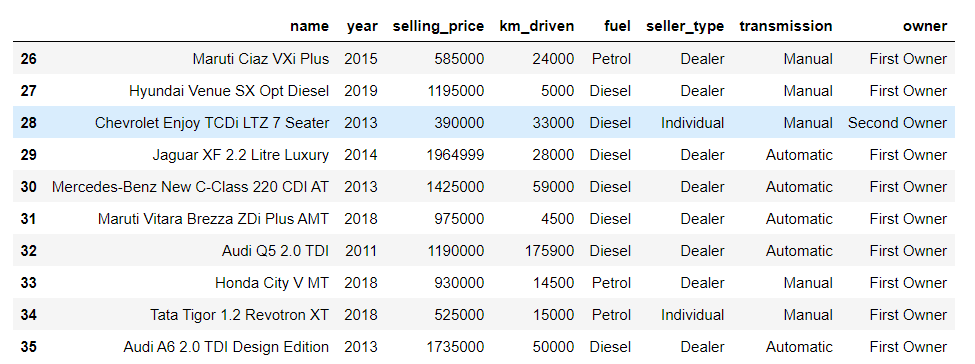
The above code will mark all duplicates as True and then delete them.
(4340, 8)
Number of Duplicate Rows: 1289
Shape of Dataset: (3051, 8)
When the keep parameter is set to False, the number of duplicate rows changes from the previous count. The DataFrame now has 3051 rows after all duplicates have been removed.
Conclusion
Data cleaning is essential for data analysis and data modeling. While performing data preprocessing, you might encounter duplicate data and this data is redundant. Duplicate data can produce biased results, skew statistical analyses, and lead to incorrect conclusions.
Duplicate data can be removed from the DataFrame using the drop_duplicates() function provided by the pandas library.
In this article, you've seen the step-by-step guide to identifying duplicate data from the DataFrame and later removing them.
Resources
https://pandas.pydata.org/docs/reference/api/pandas.DataFrame.duplicated.html
https://pandas.pydata.org/docs/reference/api/pandas.DataFrame.drop_duplicates.html
🏆Other articles you might be interested in if you liked this one
✅How to join, combine, and merge two different datasets using pandas?
✅How do learning rates impact the performance of the ML and DL models?
✅How to build a custom deep learning model using transfer learning?
✅How to standardize data using StandardSaler()?
✅How to perform data augmentation for deep learning using Keras?
✅Upload and display images on the frontend using Flask in Python.
That's all for now
Keep Coding✌✌