Comparing Files and Directories Using filecmp Module in Python

I am a self-taught Python developer who loves to write on Python Programming and quite obsessed with Machine Learning.
You've probably heard of the filecmp module, which provides functions for programmatically comparing files and directories.
Comparing Files
The filecmp module includes a function called cmp() that compares two files and returns True if they are equal, False otherwise.
Syntax
filecmp.cmp(f1, f2, shallow=True)
Parameters -
f1: First filename
f2: Second filename
shallow: If set to True and the information(os.stat signatures) of the file are identical, the files are considered equal.
Comparing Files Using cmp()
import filecmp

compare = filecmp.cmp('test_file1.txt', 'test_file2.txt')
print(compare)

----------
True
Both files (test_file1.txt and test_file2.txt) have the same content, size, and permissions, that's why the above code returned True.
Most information in both files would be similar if you used the os.stat() function to compare them.
stat1 = os.stat('test_file1.txt')
print("Information: test_file1.txt")
print(stat1)

stat2 = os.stat('test_file2.txt')
print("Information: test_file2.txt")
print(stat2)
Some os.stat() function attributes will be the same in both files.
Information: test_file1.txt
os.stat_result(st_mode=33206, st_ino=6473924465395070, st_dev=3836766283, st_nlink=1, st_uid=0, st_gid=0, st_size=20, st_atime=1689869596, st_mtime=1689856217, st_ctime=1689856083)

Information: test_file2.txt
os.stat_result(st_mode=33206, st_ino=2814749768156544, st_dev=3836766283, st_nlink=1, st_uid=0, st_gid=0, st_size=20, st_atime=1689869596, st_mtime=1689856277, st_ctime=1689856094)
The output shows that the status of both files is similar in terms of st_mode (permissions) and st_size (file size).
Comparing Files Having Different Info
import filecmp

file_path1 = 'test_file1.txt'
file_path2 = 'D:/SACHIN/Pycharm/file_handling/test.txt'

compare = filecmp.cmp(file_path1, file_path2, shallow=True)
print(compare)

----------
False
The above code returned False because the contents of both files differ, as does the file size.
Comparing Files From Different Directories
Files from two different directories can be compared using the filecmp.cmpfiles() function.
The function compares the common files in the directories specified and returns three results.
match: A list of filenames that are shared by both directories and have the same content.mismatch: A list of filenames that are shared by both directories but contain different content.errors: A list of filenames that were unable to be compared.
Syntax
filecmp.cmpfiles(dir1, dir2, common, shallow=True)
Parameters -
dir1: First directory path
dir2: Second directory path
common: A list of filenames from dir1 and dir2
shallow: If set to True and the information(os.stat signatures) of the file are identical, the files are considered equal.
For this section, consider the following directory structure with two directories called first_dir and second_dir and the following filenames:
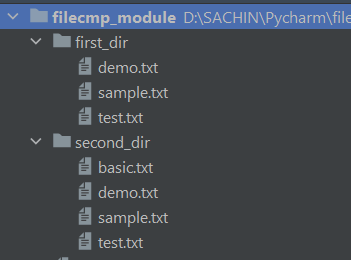
Example
import filecmp

file_dir1 = 'first_dir'
file_dir2 = 'second_dir'

common_files = ['basic.txt', 'demo.txt', 'sample.txt', 'test.txt']

matched, mismatch, not_compared = filecmp.cmpfiles(file_dir1,
                                                   file_dir2,
                                                   common=common_files)
print(f"Matched: {matched}")
print(f"Unmatched: {mismatch}")
print(f"Unable to Compare: {not_compared}")
The paths to both directories were specified in the above code, and the list of filenames to be compared was saved in the variable common_files.
The filecmp.cmpfiles() function was then called, and the directories and list of filenames were passed inside the function and assigned to three variables: matched, mismatch, and not_compared. The results were then printed.
Matched: ['sample.txt', 'test.txt']
Unmatched: ['demo.txt']
Unable to Compare: ['basic.txt']
The filenames sample.txt and test.txt matched because they have the same content and are found in both directories. The demo.txt file does not match due to different content, and the basic.txt file cannot be compared because one of the directories lacks the basic.txt file to compare with.
dircmp - Perform Directory Comparisons on Various Factors
The filecmp.dircmp() is used to create a dircmp object by passing the directories' paths to be compared. The dircmp class contains numerous methods and attributes that allow you to compare, analyze, differ, handle subdirectories, and much more by calling on the dircmp object.
Syntax
filecmp.dircmp(a, b, ignore=None, hide=None)
Parameters -
a: First directory pathb: Second directory pathignore: Specifies the list of filenames to be ignored during comparison.hide: Specifies the list of filenames to hide in the output.
Creating a dircmp Object
import filecmp

file_dir1 = 'first_dir'
file_dir2 = 'second_dir'

dircmp_obj = filecmp.dircmp(file_dir1, file_dir2)
print(dircmp_obj)

----------
<filecmp.dircmp object at 0x000001FE7ECF5A80>
The dircmp object is created by invoking filecmp.dircmp() with the paths to the directories to be compared (file_dir1 and file_dir2). By calling the methods and attributes on dircmp_obj, the directories can now be compared on various criteria.
Generating Comparison Report
The report() method generates a report comparing the specified directories.
dircmp_obj.report()

----------
diff first_dir second_dir
Only in second_dir : ['basic.txt']
Identical files : ['sample.txt', 'test.txt']
Differing files : ['demo.txt']
Calling report() on dircmp_obj compared the two directories, revealing that sample.txt and test.txt files were identical, the basic.txt file was only found in the second_dir directory, and demo.txt files were found in both directories but their contents differ.
Identifying Missing Files
The left_only and right_only attributes can be used to display filenames that are only found in the left (a) or right (b) directories. In simple words, you can find which file is present in one directory but missing in another directory.
# Displaying filenames that are only present in left_dir
filenames_only_in_left_dir = dircmp_obj.left_only
print(f"Filenames Only in Left Directory: {filenames_only_in_left_dir}")

# Displaying filenames that are only present in right_dir
filenames_only_in_right_dir = dircmp_obj.right_only
print(f"Filenames Only in Right Directory: {filenames_only_in_right_dir}")

----------
Filenames Only in Left Directory: []
Filenames Only in Right Directory: ['basic.txt']
The output above shows that the basic.txt file is missing in the left directory (first_dir), but it exists in the right directory (second_dir).
Listing Filenames
The left_list and right_list can be used to list the filenames present in the left and right directories.
# Listing filenames in left_dir
filenames_in_left_dir = dircmp_obj.left_list
print(f"Filenames in Left Directory: {filenames_in_left_dir}")

# Listing filenames in right_dir
filenames_in_right_dir = dircmp_obj.right_list
print(f"Filenames in Right Directory: {filenames_in_right_dir}")
Output
Filenames in Left Directory: ['demo.txt', 'sample.txt', 'test.txt']
Filenames in Right Directory: ['basic.txt', 'demo.txt', 'sample.txt', 'test.txt']
Similarly, the left and right attributes can be used to show the path of the left and right directories.
left_dir_path = dircmp_obj.left
print(f"Path of Left Directory: {left_dir_path}")

right_dir_path = dircmp_obj.right
print(f"Path of Right Directory: {right_dir_path}")

----------
Path of Left Directory: first_dir
Path of Right Directory: second_dir
Analyzing Files
# Displaying common files and subdirectories
common_files_dir = dircmp_obj.common
print(f"Common Files and Subdirectories: {common_files_dir}")

# Displaying common files
common_files = dircmp_obj.common_files
print(f"Common Files: {common_files}")

# Displaying common directories
common_directories = dircmp_obj.common_dirs
print(f"Common Directories: {common_directories}")

# Displaying same files
same_files = dircmp_obj.same_files
print(f"Same Files: {same_files}")

# Displaying differ files
differ_files = dircmp_obj.diff_files
print(f"Unmatched Files: {differ_files}")
Output
Common Files and Subdirectories: ['demo.txt', 'sample.txt', 'test.txt']
Common Files: ['demo.txt', 'sample.txt', 'test.txt']
Common Directories: []
Same Files: ['sample.txt', 'test.txt']
Unmatched Files: ['demo.txt']
By examining the output:
commonreturns a list of files and subdirectories that are shared by both directories.common_filesreturns the list of files that are shared by both directories.common_dirsreturns a list of directories that are shared by both directories.same_filesreturns a list of filenames that can be found in both directories and have the same content.diff_filesreturns a list of filenames that exist in both directories but have different contents.
Ignoring and Hiding Comparison of Files
If you wanted to ignore or hide any files from being compared, the filecmp.dircmp has parameters named ignore (a list of filenames to ignore) and hide (a list of filenames to hide).
import filecmp

file_dir1 = 'first_dir'
file_dir2 = 'second_dir'

# Filename to ignore
ignore = ['demo.txt']
# Filename to hide
hide = ['basic.txt']

# Creating dircmp object
dircmp_obj = filecmp.dircmp(file_dir1, file_dir2, ignore=ignore, hide=hide)

# Generating comparison report
dircmp_obj.report()

# Listing the filenames in left directory
filenames_in_left_dir = dircmp_obj.left_list
print(f"Filenames in Left Directory: {filenames_in_left_dir}")

# Listing the filenames in right directory
filenames_in_right_dir = dircmp_obj.right_list
print(f"Filenames in Right Directory: {filenames_in_right_dir}")
Output
diff first_dir second_dir
Identical files : ['sample.txt', 'test.txt']
Filenames in Left Directory: ['sample.txt', 'test.txt']
Filenames in Right Directory: ['sample.txt', 'test.txt']
Both directories' demo.txt files were ignored, and the basic.txt file was hidden from comparison.
Clearing Cache
The filecmp module includes a function called clear_cache() that allows you to clear the internal cache used by the filecmp module.
When a file is modified and then compared in such a short period of time that the rounded-off modification time is nearly the same as the comparison time, the program may conclude that the files are identical.
Sometimes certain situations may arise where you may get stuck while comparing files and getting odd results, in that case, you can give it a try to filecmp.clear_cache() function to clear any cache.
Consider the following example, in which the cache is stored after comparing the two image files and then clearing the internal cache with the filecmp.clear_cache() function.
import filecmp

file_dir1 = 'D:/SACHIN/Desktop/rise.png'
file_dir2 = 'D:/SACHIN/Desktop/media/rise.png'

# Comparing image file
compare = filecmp.cmp(file_dir1, file_dir2, shallow=False)
print(compare)
# Printing the cache stored by filecmp
print(filecmp._cache)

# Clearing cache
filecmp.clear_cache()
print(filecmp._cache)

# Checking if cache is cleared or not
assert len(filecmp._cache) == 0, 'Cache not cleared'
The assert statement was written at the end of the code snippet to ensure that the cache is cleared (the module's protected variable _cache is emptied properly), and if it is not, a message 'Cache not cleared' is displayed.
True
{('D:/SACHIN/Desktop/rise.png', 'D:/SACHIN/Desktop/media/rise.png', (32768, 6516, 1689779926.7445374), (32768, 6516, 1689779926.7445374)): True}
{}
Conclusion
The filecmp module provides functions such as cmp() and cmpfiles() for comparing various types of files and directories, and the dircmp class provides numerous methods and attributes for comparing the files and directories on various factors.
Let's recall what you've learned:
Comparing two different files
Files from two different directories are being compared.
The
dircmpclass and its methods and attributes are used to summarise, analyze, and generate reports on files and directories.Clearing the internal cache stored by the
filecmpmodule using thefilecmp.clear_cache()function.
🏆Other articles you might be interested in if you liked this one
✅How to read multiple files simultaneously using fileinput module in Python?
✅Generate temporary files and directories using tempfile module in Python.
✅assert statement - Debug your code using assert statements in Python.
✅Understanding the different uses of asterisk(*) in Python.
✅What is the difference between seek() and tell() in Python?
✅How to use match-case statements for pattern matching in Python?
✅__init__ vs __new__ methods in Python.
✅How to manipulate paths using the pathlib module in Python?
That's all for now
Keep Coding✌✌