How To Convert Bytes To A String - Different Methods Explained
I am a self-taught Python developer who loves to write on Python Programming and quite obsessed with Machine Learning.
In Python, a byte string is a sequence of bytes, which are the fundamental building blocks of digital data such as images, audio and videos. Byte strings differ from regular strings in that they are made up of bytes rather than characters.
Sometimes we work on projects where we need to handle bytes, and we needed to convert them into Python strings in order to perform specific operations.
In this article, we'll see the ways how we can convert the bytes string into the normal string in Python.
Bytes string
In Python, a byte string can be generated by prefixing the character "b" before the string's quotation mark. The following example will demonstrate how to generate a byte string.
byte_str = b"GeekPython"
We created a byte string containing the characters "G", "e", "e", "k", "P", "y", "t", "h", "o" and "n".
The upper byte string was straightforward and easy to generate, but the byte string of any image would be different from what we saw in the upper part.
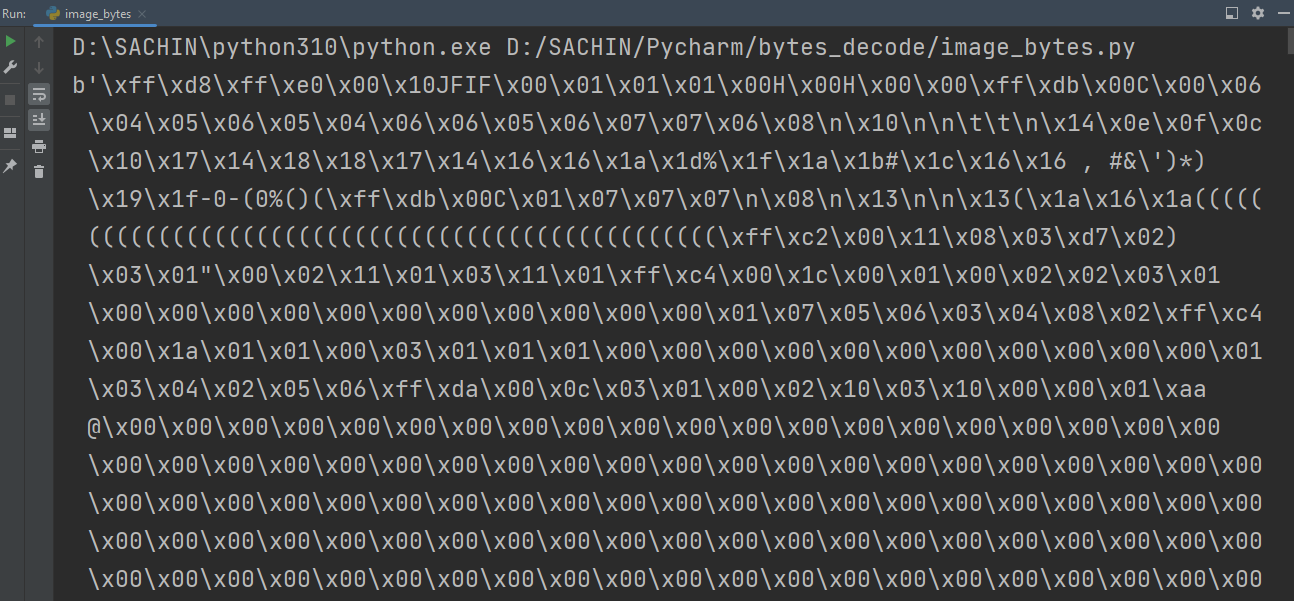
These bytes combine to make an image. These byte strings vary based on the type of data. We'll see the methods to convert the byte string into a normal string.
Method 1 - decode method
The decode method is the most commonly used method by developers. The decode method converts a byte string into a normal string using the specified encoding. Let us illustrate with an example.
# Byte string
byte_str = b"GeekPython"

# Converting
nor_str = byte_str.decode(encoding='utf-8')
print(nor_str)
# Checking the type of string
print(f'Type: {type(nor_str)}')

----------
GeekPython
Type: <class 'str'>
We used the decode method on the variable byte_str, which contains a byte string, and set the encoding to utf-8. The output shows that our byte string was converted into a normal string.
Here's an example of converting the image's byte to a string. We first saved the image's bytes in a file before converting them to a normal string.
with open('binary_file', 'rb') as file:
    chars = file.read()
    print(f'Content type in file before: {type(chars)}')
    # print(chars)
    decoded = chars.decode('utf-8', errors='ignore')
    # print(decoded)
    print(f'Content type in file after: {type(decoded)}')

----------
Content type in file before: <class 'bytes'>
Content type in file after: <class 'str'>
Note: utf-8 encoding is unlikely to be used to decode the image's byte, and if it is, the decoding will produce mojibake(garbled text).
Method 2 - codecs module
It's the same method as before, but this time we'll use the decode method from Python's codecs module.
import codecs

bstr = b'\xa3'
emoji = b'\xF0\x9F\x98\x86\xF0\x9F\x98\x81\xF0\x9F\x98\x82'

char_dec = codecs.decode(bstr, encoding='cp1252')
print(char_dec)
print(f'Type(Before decoding): {type(bstr)}')
print(f'Type(After decoding): {type(char_dec)}')

print('-'*20)

dec = codecs.decode(emoji, encoding='utf-8')
print(dec)
print(f'Type(Before decoding): {type(emoji)}')
print(f'Type(After decoding): {type(dec)}')
In the first block of code, we decoded the bytes stored in the variable bstr and specified the cp1252 encoding (used for decoding single-byte Latin alphabet characters).
In the second block of code, we decoded the emoji bytes using the default encoding.
£
Type(Before decoding): <class 'bytes'>
Type(After decoding): <class 'str'>
--------------------
😆😁😂
Type(Before decoding): <class 'bytes'>
Type(After decoding): <class 'str'>
Method 3 - str method
In this approach, we'll use the most basic technique, which is the str method. The str method converts data to a string, which we'll use to convert the byte string to a regular string.
byte_str = b'GeekPython'
print(type(byte_str))

print('-'*20)

# Using str method with encoding
normal_str = str(byte_str, 'utf-8')
print(normal_str)
print(type(normal_str))

print('-'*20)

# Using str method without encoding
without_encoding = str(byte_str)
print(without_encoding)
print(type(without_encoding))
In the first block of code, we used the str method and passed a byte string with the utf-8 encoding. In the second block of code, we did the same thing as in the first, but we didn't specify the encoding.
<class 'bytes'>
--------------------
GeekPython
<class 'str'>
--------------------
b'GeekPython'
<class 'str'>
We can see a difference in both outputs, but they are both in string format.
Comparing execution time
We can compare the execution time of these three methods to see which one is the fastest.
import timeit

print("Execution time of decode method:")
print(timeit.timeit(stmt='byte_str=b"GeekPython";n=byte_str.decode("utf-8")'))

print('-'*20)

print("Execution time of codecs.decode method:")
print(timeit.timeit(setup="import codecs", stmt='byte_str=b"GeekPython";n=codecs.decode(byte_str, "utf-8")'))

print('-'*20)

print("Execution time of str method:")
print(timeit.timeit(stmt='byte_str=b"GeekPython";n=str(byte_str, "utf-8")'))
We measured the execution time of the code snippets using the timeit module.
Execution time of decode method:
0.14236710011027753
--------------------
Execution time of codecs.decode method:
0.7000259000342339
--------------------
Execution time of str method:
0.177455399883911
The decode method code snippet took less time to execute than the other two methods. The execution time difference between the decode method and the str method is not that big.
Conclusion
In this article, we've learned the different methods to convert the byte string into the regular string. We've seen three methods which are as follows:
using the
decodemethodusing the
codecs.decodemethodusing the
strmethod
These three methods can be used to convert a byte string to a regular string, but the first choice for the developers can be the decode method because it is simpler and consumes less time than the other two methods.
🏆Other articles you might be interested in if you liked this one
✅Here's how we can format the string in different ways.
✅Number the iterable objects using the enumerate() function in Python.
✅Different ways to remove whitespaces from the string.
✅How do bitwise operators work behind the scenes in Python?
✅What are args and kwargs parameters within the function in Python?
✅Asynchronous programming in Python using asyncio module.
✅Create a virtual environment to create an isolated space for projects in Python.
That's all for now
Keep Coding✌✌