Accessing List Values Within The Dictionary In Python

I am a self-taught Python developer who loves to write on Python Programming and quite obsessed with Machine Learning.
The dictionary is a data structure in Python that belongs to the mapping category. When data(key-value) is enclosed by curly({ }) braces, we can say it is a dictionary.
A dictionary has a key that holds a value, also known as a key-value pair. Using the dictionary[key], we can get the value assigned to the key.
What if the dictionary contains the values in the form of a list? In this article, we'll look at all of the different ways to access items from lists within the dictionary.
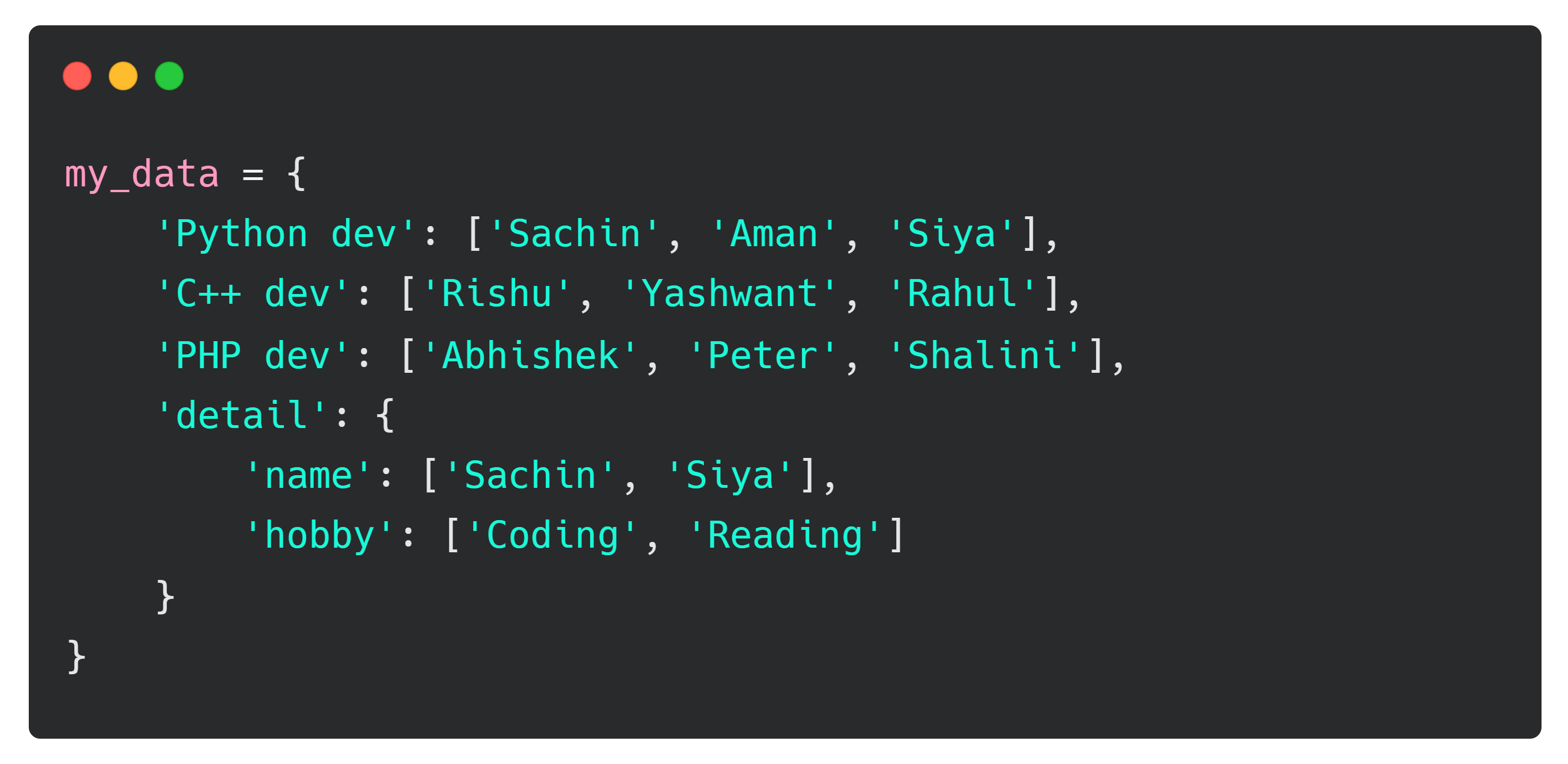
Sample data
Given data contains items in a list as the values of keys within the dictionary. We'll work with this given data throughout the article.
Using Indexing
In the following example, we've used the indexing method and passed the index along with the key from which the value is to be extracted.
The convention dict_name[key][index] must be used to access the list values from the dictionary.
# Using indexing

# Accessing list items from the key
acc_key = my_data['Python dev']
print(acc_key)
# Accessing first list item from the key
acc_data = my_data['C++ dev'][0]
print(acc_data)

# Accessing third list item from the key
acc_data1 = my_data['PHP dev'][2]
print(acc_data1)

# Accessing second list item from the key 'name' from
# the dictionary 'detail' within the dictionary 'my_data'
acc_dict_item = my_data['detail']['name'][1]
print(acc_dict_item)
Output
['Sachin', 'Aman', 'Siya']
Rishu
Shalini
Siya
When we accessed only the key, we got the entire list, but when we specified the index number with the key, we got the specific values.
Using slicing
It's the same as the previous method, except instead of specifying the index value, we've used the slicing range.
# Using slicing method

# Accessing list items by skipping 2 steps
val = my_data['Python dev'][:3:2]
print(val)

# Accessing first list item from the end
val1 = my_data['C++ dev'][-1:]
print(val1)

# Accessing list items except the last item
val2 = my_data['PHP dev'][:-1]
print(val2)
Output
['Sachin', 'Siya']
['Rahul']
['Abhishek', 'Peter']
Using for loop
The for loop has been used in the following example to iterate over the values of the list in the dictionary my_data.
# Using for loop

# 1 - Accessing key and values from the dict 'my_data'
for key, value in my_data.items():
    print(key, value)

print('-'*20)

# 2 - Iterating over list items from each key
for key, value in my_data.items():
    for items in value:
        print(f'{key} - {items}')

print('-'*20)

# 3 - Iterating list items from nested dictionary 'detail'
for key, value in my_data['detail'].items():
    for items in value:
        print(f'{key} - {items}')

print('-'*20)

# 4 - Accessing list item from individual key
for value in my_data['PHP dev']:
    print(value)
We iterated both keys and values from the dictionary my_data in the first block of code, then the list items from each key in the second block, the list items from each key within the nested dictionary detail in the third block, and the list items of the specific key in the last block of code.
Output
Python dev ['Sachin', 'Aman', 'Siya']
C++ dev ['Rishu', 'Yashwant', 'Rahul']
PHP dev ['Abhishek', 'Peter', 'Shalini']
detail {'name': ['Sachin', 'Siya'], 'hobby': ['Coding', 'Reading']}
--------------------
Python dev - Sachin
Python dev - Aman
Python dev - Siya
C++ dev - Rishu
C++ dev - Yashwant
C++ dev - Rahul
PHP dev - Abhishek
PHP dev - Peter
PHP dev - Shalini
detail - name
detail - hobby
--------------------
name - Sachin
name - Siya
hobby - Coding
hobby - Reading
--------------------
Abhishek
Peter
Shalini
Using list comprehension
The list comprehension technique is used in the following example. It's the same method as before, but this time we've used the for loop within the list.
# Using list comprehension

# Accessing list item from the key 'Python dev'
lst_com = [item for item in my_data['Python dev']]
print(lst_com)

# Accessing list item from nested dictionary
lst_com1 = [item for item in my_data['detail']['name']]
print(lst_com1)
Output
['Sachin', 'Aman', 'Siya']
['Sachin', 'Siya']
Using unpacking(*) operator
You've probably used the asterisk(*) operator for multiplication, exponentiation, **kwargs, *args, and other things, but we're going to use it as an unpacking operator.
# Using unpacking operator

# Accessing values from every key
using_unpkg_op = [*my_data.values()]
print(using_unpkg_op)
print('-'*20)
print(using_unpkg_op[0])

print('-'*20)

# Accessing list items from the key 'Python dev'
using_unpkg_op = [*my_data.get('Python dev')]
# Accessing first item from the list
print(using_unpkg_op[0])
The expression *my_data.values() in the preceding code will return all the values of the keys in the dictionary my_data, and once the values are returned, we can specify the index number to access specific data.
The expression *my_data.get('Python dev') returns the values of the key Python dev, and through indexing, we can access the list item.
Output
[['Sachin', 'Aman', 'Siya'], ['Rishu', 'Yashwant', 'Rahul'], ['Abhishek', 'Peter', 'Shalini'], {'name': ['Sachin', 'Siya'], 'hobby': ['Coding', 'Reading']}]
--------------------
['Sachin', 'Aman', 'Siya']
--------------------
Sachin
Conclusion
In this article, we've seen the different methods to access list items within the dictionary. The dictionary we've operated on contains the keys with the values as a list and also a nested dictionary.
We've used five methods to access the list items from the dictionary which are as follows:
Indexing - Using the bracket notation(
[ ])Slicing - Using the list slicing
Iterating - Using the
forloopList comprehension technique
Unpacking(
*) operator
Well, this is it for the article, try to find some more methods to access list items within the dictionary.
🏆Other articles you might be interested in if you liked this one
✅How list reverse() is different from the reversed() in Python?
✅8 different ways to reverse the Python list.
✅Python one-liners that will make your code more efficient.
✅Understanding NumPy argmax function in Python.
✅How to read multiple files simultaneously using the with statement in Python?
✅Using asynchronous(async/await) programming in Python.
✅Different ways to remove whitespaces in Python.
That's all for now
Keep Coding✌✌